iPhone · Coming soon
Nobody is recording
the room you are in
Online meetings leave a record. What was decided in person starts fading the moment the room empties. Voice Context keeps those conversations in a form an AI can read.
iOS 26 or later. Japanese and English conversations.
01
Stop starting with
the backstory
When you go to an AI for help, you begin by explaining the history. Who said what, what the deadline was, why that option won. Typing all that out from memory costs you time, every single time.
— what this app exists to remove
02
The conversation is kept as structure
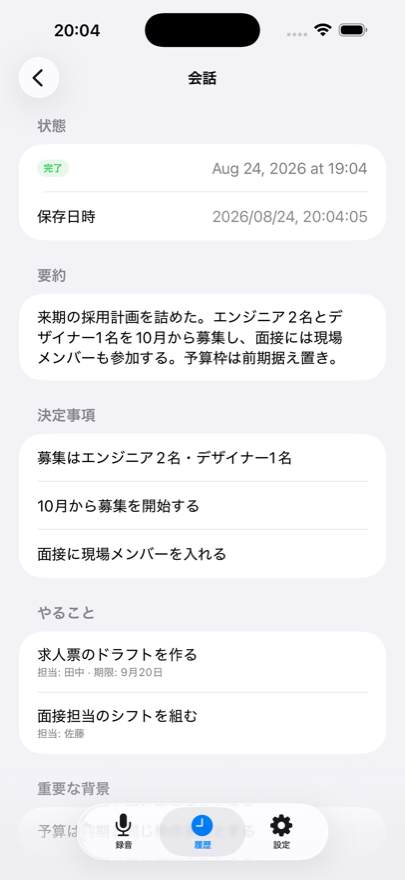
Stop the recording, and what was said is organized into the fields below. The conditions that matter later are kept as background.
- SummaryTwo to five sentences on what the conversation was
- DecisionsOnly what was actually agreed, not what was suggested
- Action itemsWith an owner and a due date; left empty when unknown
- Important backgroundReasons, constraints, assumptions — what changes later calls
- Open questionsWhat was not settled in the room
- KeywordsHandles for finding it again
"Cutting the quote isn't possible, but a two-week extension on delivery would work" — a condition like that is kept as background, not as a decision. It is the half that matters the next time the subject comes up.
Hand it over mid-meeting
In a long discussion you do not have to wait for the end. Whenever the talk pauses for 20 seconds, everything so far becomes structure while recording continues. You can ask an AI what it thinks right there.
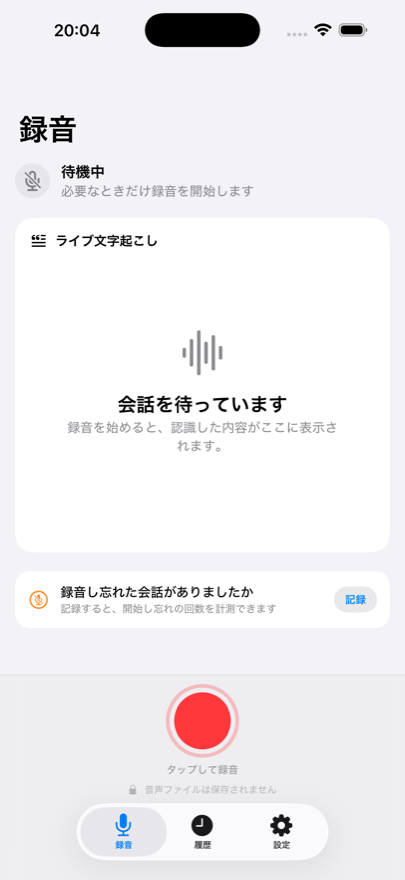
Starting works the same way. Recording begins from Control Center, the Lock Screen, Shortcuts, or Siri — so fewer conversations get going while you are still hunting for the app.
03
The developer never receives your conversations
This is not a policy statement, it is the architecture. There is no server operated by the developer.
Recorded audio
Not stored. It is processed for transcription and nothing else.
The transcript
Stays on your iPhone.
Structuring
Runs on your own Mac, or on a destination you configure.
What reaches the developer
Nothing. Not the conversations, not your usage.
Once data reaches a destination you configured, its handling is governed by the terms between you and that provider. If you use an AI service, review its terms yourself, including any opt-out from training on your data.
What you need to get started
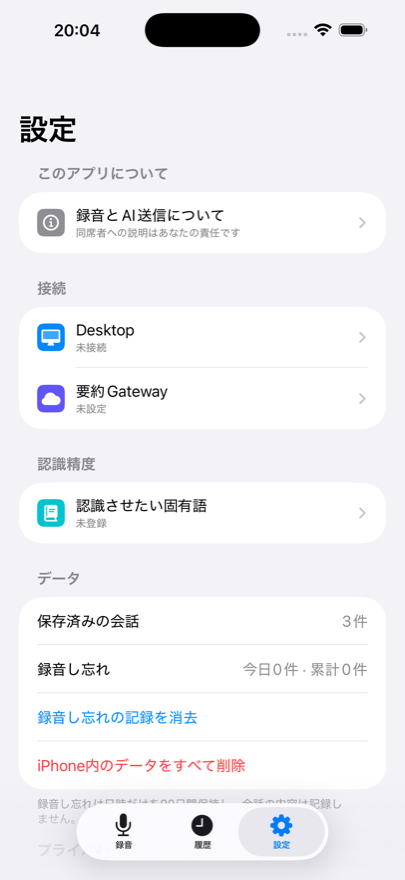
Structuring requires a destination: either an AI on your own Mac, or the URL of a Gateway you run yourself.
With neither configured, recording and transcription still work, but no summary or decisions are generated. On its own, the app goes as far as transcription.
04
Before you use it
The app says the same things on its first screen, and does not let you skip past them.
- Telling the people present is your responsibility. Tell everyone in the room, in advance, that you are recording and that the transcript will be sent to an AI service. Complying with the rules of your employer, school, or clients, and with your local laws, is up to you. This app does not judge whether a recording is permitted, and using it does not make one lawful.
- Accuracy is not guaranteed. Speech recognition leaves errors behind. Summaries are generated by AI and may not match the facts. They cannot be used as a verbatim record or as evidence.
- Names of people and companies are sent as they are. Nothing is masked. Decide whether a conversation should be sent before you send it.